10 Pinterest Templates: Pinterest Covers to Elevate Your Profile
Your Pinterest profile cover is more than just a decorative header; it's a powerful piece of digital real estate. Think of it as a billboard for your brand. It's the first thing a potential follower or customer sees, and in those crucial first seconds, it needs to communicate who you are, what you offer, and why someone should stick around. Yet, so many creators and businesses leave this space blank or use a poorly sized image, missing a huge opportunity to make a strong first impression. This is where having the right design assets becomes a game-changer.
What Are These Editable Pinterest Cover Templates?
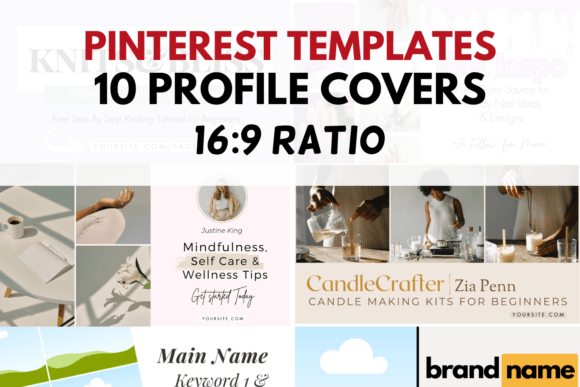
This collection of 10 Pinterest Templates: Pinterest Covers is a set of pre-designed, fully customizable graphics created specifically for your profile's header. Each template is built within Canva, a user-friendly online design tool, making them accessible to everyone regardless of their design experience. The visual style of these templates leans towards modern typography and clean layouts. You'll find a mix of sans serif font options for a crisp, contemporary feel, with some templates incorporating a subtle script font or handwritten font for a more personal, approachable touch. The overall personality is professional yet creative, designed to be a versatile foundation for a wide range of brands.
The core appeal lies in their practicality. Sized correctly at 1920 x 1080 pixels—the ideal 16:9 ratio for Pinterest—they eliminate the guesswork and frustration of trying to get your cover image to display properly. But these aren't rigid, one-size-fits-all files. They are editable design assets. You have complete control to change colors to match your brand identity, swap out the placeholder text with your own keywords and tagline, and even combine elements from different templates. For instance, you might love the layout from Template 3 but prefer the color palette of Template 7. You can easily mix and match to create a truly unique cover that feels custom-made for your niche, whether you're a food blogger, a graphic designer, a small e-commerce shop owner, or a life coach.
Strategic Applications for Maximum Impact
Understanding where and how to use these templates is key to unlocking their full potential. The most obvious application is for your social media graphics, specifically your Pinterest profile. A well-designed cover instantly boosts your profile's professionalism, signaling to visitors that you are a serious and dedicated creator. This directly influences brand perception and can be the deciding factor in whether someone chooses to follow you or click through to your website.
Beyond the profile header, the principles and even the base designs can be repurposed. Consider these practical uses:
- Brand Consistency: Use the cover as a style guide for your other Pinterest graphics. The chosen fonts, colors, and layout style can be echoed in your Pin templates, creating a cohesive and recognizable visual feed. This consistency is crucial for building brand recognition.
- Website & Blog Graphics: Adapt a template to create a featured image for a blog post or a banner for a specific category page on your website. This strengthens your web design and connects your Pinterest presence directly to your site's look and feel.
- Digital Product Mockups: If you sell digital products like e-books, courses, or presets, you can use a template as a stylish backdrop for a mockup, adding a layer of professionalism to your promotional graphics.
- Print Materials: While designed for digital, the high-resolution files can be adapted for simple print projects. Think business card backs, thank you card designs, or even small posters for a craft fair booth. This versatility makes them a valuable addition to your library of design assets.
Choosing and Customizing Your Perfect Cover
With ten options, how do you select the right one? Start by evaluating your project's fit. Look at the overall layout. Does it have enough space for the text you need to include? A photographer might prefer a template with a large image placeholder, while a writer might want one that emphasizes text-based keywords. Consider the existing visual hierarchy of the template. A good design guides the viewer's eye from the most important element (like your brand name or core service) to the less important details.
Once you've chosen a base, the real fun begins. Customization is about more than just swapping colors. Think about how you can use font pairing to your advantage. While the templates come with suggested pairings, you can experiment. Try combining a bold display font for your main headline with a clean, legible sans serif font for the subtext. This creates a clear visual hierarchy that improves readability and impact. Remember, the goal is not just to make something that looks good, but something that communicates effectively.
Finally, always test your final design. View it on both a desktop and a mobile device. How does it look in the small, circular crop that often appears on mobile feeds? Is the text still legible? Is the most important information visible? This final step ensures your hard work translates into a positive user experience, reinforcing your brand's professionalism and encouraging the engagement you're looking for. By treating your Pinterest cover as a strategic component of your brand's visual system, you turn a simple image into a powerful tool for growth.