Mastering Y2K Visuals: 15 Mockup Templates for Modern Brands
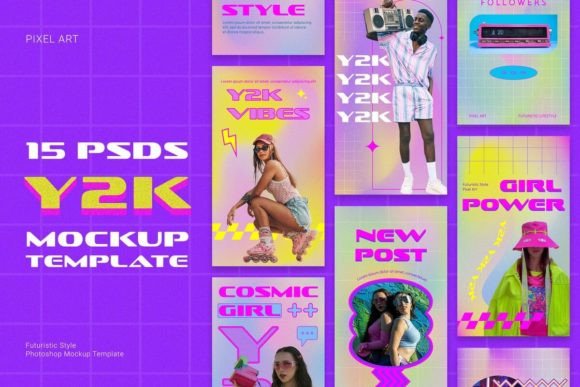
If you’ve scrolled through Instagram or Pinterest lately, you know that nostalgia is a powerful currency. The resurgence of the early 2000s aesthetic—specifically the Y2K look—has moved beyond a fleeting trend into a legitimate design language. However, recreating that specific blend of optimism, technology, and pop culture from scratch is time-consuming. This is where the 15 Y2K Mockup Photoshop Templates collection becomes an essential part of your creative toolkit. These aren't just static images; they are fully editable PSD files designed to bridge the gap between retro-futurism and modern social media requirements.
Deconstructing the Y2K Aesthetic: More Than Just Pink and Silver
To effectively use these templates, it helps to understand the visual DNA you are working with. The Y2K aesthetic is a specific cocktail of styles. It embraces the "Cyber" aspect of cyberpunk but softens it with the playfulness of Kidcore. You will notice the templates rely heavily on Retro Futurism—a vision of the future as imagined in the late 1990s. This includes shiny, chrome-like textures, translucent plastics (often in pink or blue), and a fascination with digital space.
Within these 15 PSD mockups, you will find a distinct use of Pixel Art and 90s Glitch effects. These elements serve as a nod to the era's gaming culture and the imperfections of early digital media. When you open the files, pay attention to the Geometric Shapes and Neon Colors. These are not random placements; they are designed to guide the viewer's eye. The Pink Holographic Background is a signature element of this style, providing a vibrant, energetic canvas that makes foreground text and images pop. The typography included often mimics Futuristic Typography, featuring sharp edges or bubbly, rounded forms that feel distinctly "millennial."
Practical Applications: Where These Templates Shine
While the aesthetic is rooted in the past, the application is strictly modern. These templates are sized at 1080 x 1920 pixels at 300 DPI, making them industry-standard for vertical content. This means they are ready to use immediately for Instagram Stories, Facebook Stories, and Pinterest Idea Pins without any cropping or quality loss.
For content creators and influencers, these mockups offer a quick way to maintain a cohesive feed. Instead of struggling with layout, you can use these as a base for announcement posts, sale promotions, or mood boards. The Bright Vintage color grading helps unify disparate photos into a single, recognizable aesthetic.
Small business owners and marketers can leverage these for product branding. If you are launching a streetwear line, a digital product, or a beauty brand, the Y2K style communicates youthfulness and trend-awareness. Use the templates to create mockups for product drops. The Geometric Shapes can frame product images, while the Neon Colors can highlight key selling points like "New Arrival" or "Limited Edition."
Optimizing Your Workflow with Organized Layers
A common frustration with mockup packs is disorganization. However, these 15 Y2K Mockup Photoshop Templates are structured with organized layers. This is a critical feature for professional efficiency. You do not need to be a Photoshop expert to customize them, but understanding layer management helps.
- Smart Objects: Look for the Smart Object layers. This is where you place your own imagery. Double-clicking this layer allows you to paste your photo, save, and watch it automatically warp to fit the perspective of the mockup.
- Color Adjustments: Because the files are PSD-based, the Neon Colors are not baked in permanently. You can adjust the Hue/Saturation layers to shift the palette from a "Cyberpunk" blue/purple scheme to a softer "Kidcore" pastel palette if your brand requires it.
- Typography Layers: The Futuristic Typography layers are editable. You can swap out the placeholder text for your brand slogans. Ensure you have a compatible premium font installed to maintain the vibe, or use the included styles to match the intended look.
Strategic Branding: Beyond the Instagram Feed
While these are marketed for social media, a savvy brand strategist looks at the bigger picture. The visual language of Y2K is highly effective in web design and packaging design right now.
Consider using elements from these mockups to design website banners. The Pink Holographic Background can be extracted and used as a texture for a landing page hero section. This creates a seamless transition between your social media marketing and your actual website, reinforcing brand identity.
For entrepreneurs in the digital space, such as those selling planners or digital art, these templates serve as the perfect "packaging." Since you cannot physically hold a digital product, the visual presentation is everything. A mockup that looks tactile, shiny, and futuristic increases the perceived value of the digital asset you are selling.
Technical Considerations and Compatibility
It is important to note the technical requirements to ensure a smooth process. These templates are optimized for Adobe Photoshop CC 2020 and newer versions. While they may open in older versions or alternative software like Photopea, the full functionality of the organized layers and Smart Objects is best realized in the latest CC versions.
The 300 DPI resolution is a significant advantage. While 72 DPI is standard for web, 300 DPI allows for versatility. If you decide to repurpose your social media graphics for a printed lookbook, a flyer, or sticker sheets, the image quality will remain crisp. This makes the templates a valuable design asset for both digital and print projects.
Pairing and Customization Tips
When working with these templates, contrast is your friend. The backgrounds are often busy with Pixel Art and Glitch effects. Therefore, your foreground content needs to be clean.
- Font Pairing: If you are adding your own text, pair the bold, futuristic display fonts included in the template with a clean sans serif font. This ensures readability. A geometric sans-serif pairs well with the Y2K vibe without cluttering the design.
- Image Selection: High-contrast photography works best. The Retro Futurism elements can sometimes wash out low-contrast images. Use photos with strong shadows or bright highlights to stand out against the holographic textures.
- Color Harmony: While the templates are vibrant, try to limit your added elements to two or three colors. If the background is neon pink and blue, pick one of those colors for your text accents to maintain a professional hierarchy.
Final Verdict: A Versatile Toolkit for Modern Creators
The 15 Y2K Mockup Photoshop Templates are more than just a trend-chasing purchase; they are a functional set of design assets for anyone looking to inject energy into their visual content. They solve the problem of "blank page syndrome" by providing a structured, high-energy starting point.
Whether you are a blogger curating a mood board, a marketer launching a campaign, or a hobbyist exploring digital art, the blend of Cyberpunk and Kidcore offers a unique visual hook. By utilizing the organized layers and understanding the interplay of Neon Colors and Futuristic Typography, you can produce professional-grade content that resonates with a modern audience hungry for that specific mix of digital nostalgia and future-forward design.